MahsaNG VPN
- 4.2
- Rating
- 1.00M
- Installs
- Free
- Price

 Analysis by App-foxy
I approached MahsaNG VPN as a practical tool rather than a flashy security product. Its purpose is straightforward: it is a distributed V2Ray VPN from Holistic Resilience, designed for Android users who need a different route for their internet traffic. In everyday use, that makes it most relevant when a normal connection is unreliable, restricted, or unable to reach a service consistently.
The app is free, carries an Everyone age rating, and is available for devices running Android 5.0 or later. It has reached over one million installs and holds a 4.2 average from around eighteen thousand ratings, with hundreds of written reviews. Those figures suggest that it has found a sizeable audience, but they do not remove the need to understand how a V2Ray-based tool feels in real use. My impression is that its value depends less on decoration and more on whether you are comfortable with a connection utility that may require patience and experimentation.
How MahsaNG VPN feels to read and navigate
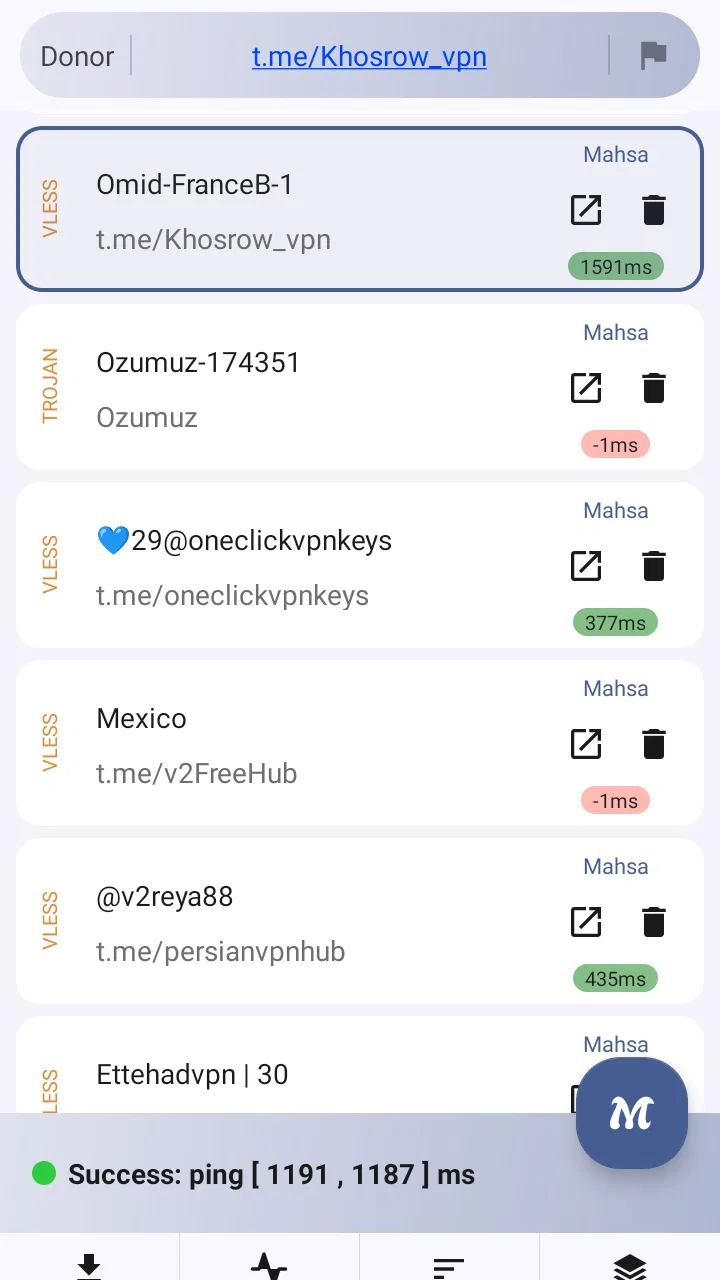
The first thing I look for in a VPN tool is whether I can understand its current state without studying every screen. A connection app should make the important question obvious: am I connected, and is traffic currently passing through the VPN? MahsaNG VPN is best approached with that expectation. Its usefulness comes from the connection workflow, not from a large collection of lifestyle features or content.
You May Also Like

 Blood Strike: 2.5 Anniversary
Blood Strike’s Loadouts Turn Every Drop Into a Tactical Gamble
A close look at Blood Strike’s custom loadouts: how fast access to signature weapons reshapes its battle royale rhythm, rewards preparation, and narrows the gap between fights.

 Pandora - Music & Podcasts
Pandora’s Music Is Easy to Start, but Harder to Recover
Pandora’s strength is its low-effort path from a seed to a station. Its weak spot is how much confidence it asks you to place in connection, setup, and quiet recovery.

 8 Ball Pool
 Is Built on Rivalries, Rematches, and Routine
A close look at the rivalries, rematches, shared routines, and unanswered safety questions that turn a quick pool match into a persistent mobile community.

 Samsung Music
’s Quiet Strength Is Playing What You Already Own
Its reach comes less from spectacle than from dependable access to a personal library. That simplicity is both the app’s strongest retention engine and its ceiling.

 AccuWeather: Weather Radar
AccuWeather Review: A Quick, Clear Forecast for Everyday Decisions
For everyday plans, the best forecast is the one you can understand quickly. AccuWeather makes rain timing, radar, and local conditions easy to act on, with a few trade-offs.

 Hill Climb Racing
Why Hill Climb Racing Still Turns Crashes Into One More Run
A tiny car, a bumpy hill and one more upgrade: Hill Climb Racing keeps resurfacing because its simple chaos makes every near-miss feel personal.
More From Our News Desk



For users with good vision and familiarity with Android settings, the basic idea is easy to grasp. You open the app, inspect the available configuration, and begin the connection process. The difficulty is that V2Ray terminology can be less familiar than the language used by mainstream one-tap VPN services. Someone who has only used polished commercial VPN apps may wonder what a profile, route, or server choice means before feeling confident enough to continue.
This matters for readability because technical language creates a barrier even when the text itself is clear. A reader with limited technical experience may need to pause and search for explanations before changing anything. I would not describe the app as impossible to learn, but I would recommend using it when you have enough time to understand the connection method instead of opening it during an urgent situation and expecting instant clarity.
The current version is 16, which tells me that the app has continued through multiple iterations rather than remaining a one-off experiment. Still, version numbers do not guarantee that every screen will suit every user. Android interfaces can vary considerably between phones, and text size, contrast, notification behavior, and system navigation depend partly on the device. If you rely on enlarged text or display scaling, check the connection screen carefully: technical controls can become harder to scan when labels wrap or when several options sit close together.
I found that the most sensible workflow is to keep the first setup deliberately simple. Do not change several connection options at once. Establish one working configuration, test a few ordinary websites or apps, and only then investigate alternatives. This is a useful habit with MahsaNG VPN because it gives you a clear point of comparison when a later change makes the connection slower or prevents it from starting.
Why a simple setup is especially important
Many people treat VPN apps as interchangeable switches, but a distributed V2Ray VPN can involve more decisions than a conventional consumer service. That flexibility can be valuable, yet it also increases the amount of information the user must interpret. If you are helping a family member, I would prepare the app while sitting beside them rather than sending a long list of instructions. Show them how to identify a successful connection and how to stop it, then leave the advanced choices alone until they are needed.
There is also a practical accessibility benefit to reducing unnecessary decisions. Users with attention difficulties, memory limitations, or cognitive fatigue often do better with a repeatable sequence: open the app, choose the known working option, connect, and verify. MahsaNG VPN can fit that routine once the initial setup is understood, but it is less forgiving when the user has to troubleshoot without guidance.
One non-obvious strength is that a tool like this can be easier to keep mentally organized when you treat it as a dedicated utility instead of an always-running background service. I prefer opening it only when I need the alternate route, checking the result, and closing or disconnecting when finished. That approach reduces uncertainty about whether the VPN is active and makes it easier to notice when an ordinary connection would be faster.
Motor, visual, hearing, and sensory considerations
MahsaNG VPN does not need rapid tapping or game-like precision, which is helpful for users with limited dexterity or hand tremors. The main interaction is deliberate: select an option, start a connection, and wait for the system to respond. That is more manageable than an interface filled with tiny controls that demand repeated gestures.
Even so, VPN setup can become frustrating for anyone who has difficulty with precise touch. Android system dialogs may appear during connection, and the exact placement of buttons can vary by manufacturer. If tapping small controls is hard, I would use the phone’s built-in accessibility features, such as larger display settings or an alternative input method, where available. The important point is that these adjustments come from Android and the device itself; I would not assume that the app provides specialized accessibility controls of its own.
For users with low vision, the biggest challenge is not necessarily the amount of text but the meaning packed into technical labels. A large font can improve legibility while still leaving the user unsure which option is safe to select. Screen magnification may help with reading, but it can also make it harder to see the full connection state at once. I recommend checking the status after every action rather than relying on a single part of the screen.
People who are color-blind should not depend on color alone to judge whether the connection worked. A reliable routine is to combine the visual state with an actual test: open a service that normally fails on the regular route, or check whether a familiar page loads consistently. This is more dependable than assuming that a color change always communicates the whole situation.
Hearing-related access is less central because the task does not depend on spoken instructions. That can suit users who prefer silent interaction. At the same time, users should not assume that every important state change will be communicated in a way they can notice without looking at the screen. I would keep visual confirmation as part of the routine, especially after returning to the phone from another task.
Sensory sensitivity also deserves attention. VPN connection attempts can involve waiting, system prompts, and changes in network behavior. If unpredictable interruptions are stressful, prepare the configuration before you need it and avoid experimenting while travelling or under time pressure. The app is more comfortable when used as a planned tool than as a last-second rescue.
A realistic everyday scenario
Imagine that I am working from a café and a service I need is inconsistent on the local network. I would first save my work, open MahsaNG VPN, use the configuration that I already tested, and start the connection. After waiting for the Android connection state to settle, I would test the service with a small, low-risk action rather than immediately uploading a large file or starting a video call.
If the service works, I would continue while remembering that a VPN can add delay. If it becomes slow, I would avoid repeatedly switching options in the middle of the task. Instead, I would disconnect, return to the normal connection if appropriate, and try again later with a different configuration. This workflow is kinder to users who need predictable steps, and it prevents a temporary network problem from turning into a confusing series of unexplained changes.
For someone with limited mobility, the same scenario can be made easier by preparing the app before leaving home. The goal is to avoid navigating technical screens while standing, carrying bags, or relying on one hand. A tested setup also helps users who experience fatigue, because they can complete the essential action with fewer repeated attempts.
Situational access: where the app helps and where it does not
The strongest case for MahsaNG VPN is situational. It can be useful when a normal route is unreliable or when a distributed V2Ray approach is more suitable than a conventional VPN connection. That makes it interesting for users who need control over how traffic is routed and who are willing to learn a more technical workflow.
It is less appealing if your only requirement is a polished one-tap experience with a large server directory, prominent speed information, and guided support. Mainstream VPN alternatives usually focus on hiding the technical details. MahsaNG VPN takes a different path: its V2Ray foundation is the central idea, so the user may have to understand more of the connection environment.
That difference is not automatically a weakness. Technical users may prefer a tool that does not bury the connection model behind marketing language. A person who already knows why a V2Ray route is useful may find the app more relevant than a generic VPN with many unrelated features. A first-time VPN user, however, may be better served by an alternative that explains each choice in plain language and offers a more guided setup.
Travel is another context where expectations need to be realistic. Networks can change from one place to another, and a configuration that worked at home may not behave identically on public Wi-Fi or mobile data. I would test MahsaNG VPN on the connection type I expect to use before depending on it. This is especially important for users who need access for work, healthcare, education, or communication and cannot afford to troubleshoot under pressure.
The app can also be useful for people sharing a phone with someone who has different access needs. One person may want the VPN for a specific task, while another may prefer the speed of the regular connection. In that case, agreeing on a simple visual or verbal routine for connecting and disconnecting is safer than leaving the VPN active without explanation. It reduces the chance that the next user mistakes slower browsing for a general phone problem.
One practical trade-off is that privacy and reachability are not the same thing. A VPN route may help a service load, but it can also introduce latency or cause a website to treat the connection differently. I would not use MahsaNG VPN automatically for every activity. For ordinary browsing on a trusted network, the regular connection may be more responsive. For a task affected by routing problems, the VPN may be worth the extra delay.
Who should use it, and who should skip it?
I would recommend MahsaNG VPN to Android users who specifically want a distributed V2Ray VPN, have a clear reason for using one, and are comfortable learning through testing. It is also a reasonable choice for someone who wants a free tool rather than a paid subscription and does not need a heavily guided commercial experience.
I would suggest skipping it if you need guaranteed simplicity, immediate customer assistance, or a service where every technical decision is handled for you. It is not the first app I would hand to a person who becomes anxious when a connection fails and has no nearby helper. Nor would I make it the sole connection plan for a critical appointment or deadline until I had tested it thoroughly on the intended network.
Users should also remember that a VPN does not make every online activity safe by itself. It does not replace strong account passwords, careful handling of suspicious messages, or sensible decisions about which services to trust. MahsaNG VPN addresses the route used for network traffic; it should not be treated as a complete security solution for the phone.
The barriers that remain
The main barrier is the gap between technical capability and everyday explanation. The store summary presents the app as a distributed V2Ray VPN, which is accurate but not enough to tell a beginner what the first successful session should look like. A user may install it because it is free, then discover that the concept requires more background than a typical one-tap VPN.
Another barrier is troubleshooting. When a connection fails, several causes may look similar from the user’s perspective: the chosen route may be unavailable, the network may be unstable, the configuration may need adjustment, or the service being tested may be having its own problem. Without a clear diagnostic routine, users can waste time changing settings that were not responsible for the failure.
My advice is to troubleshoot in layers. First, check whether the phone has ordinary internet access. Next, try the known working configuration without modifying it. Then test a small, familiar service. Only after those checks should you consider changing an option. This is a concrete way to reduce cognitive load and prevents a user with limited technical confidence from losing the original working setup.
There is also a maintenance burden. Android devices differ in battery management, background restrictions, and network handling. Even when the app itself has not changed, a phone update or a new Wi-Fi environment can affect the experience. Users who need dependable access should keep a written note of the basic steps and the last configuration that worked, using plain language rather than relying on memory.
For people with accessibility needs, documentation from a trusted helper can be more valuable than another setting inside the app. A short note such as “open the app, choose the saved option, connect, wait, then test the service” is easier to follow than a long explanation of protocols. This is one area where the product can be made more inclusive through the surrounding support, even if the interface itself remains technical.
Privacy expectations are another reason to read carefully and avoid assumptions. A VPN changes the path of traffic, so users should choose configurations and sources responsibly. I would not import an unknown configuration simply because it promises better speed. The convenience of getting connected quickly is not worth ignoring the trust question behind the route you are using.
My inclusive verdict on MahsaNG VPN
After looking at it through the needs of different users and situations, I see MahsaNG VPN as a focused tool with a clear audience. Its free access, broad Android compatibility from version 5.0 onward, and established user base make it easy to try. Holistic Resilience has built something aimed at people who want a distributed V2Ray VPN rather than another generic app that hides every technical detail.
Its accessibility story is mixed. The interaction does not demand fast reactions, audio cues, or complicated gestures, which helps many users with motor or sensory needs. The larger challenge is comprehension: technical choices, uncertain connection behavior, and troubleshooting can exclude people who need a simple, predictable path. With a tested configuration and a short routine, the experience becomes much more manageable. Without that preparation, the same flexibility can feel like friction.
My recommendation is to treat MahsaNG VPN as a specialized utility, not a universal replacement for every VPN alternative. If you understand why you want V2Ray routing and are prepared to test it on your own networks, it can be a useful free addition to an Android phone. If you need the most accessible experience in the broadest sense—clear guidance, minimal decisions, and support when something goes wrong—a more guided VPN service may suit you better.
For me, the deciding question is not whether the app can connect once. It is whether I can repeat the process calmly, verify the result, and return to a normal connection when the VPN is no longer useful. MahsaNG VPN earns a place on my shortlist for users who value that kind of control, but I would introduce it gradually, document the working routine, and never assume that technical flexibility automatically means effortless access.
FAQs for MahsaNG VPN
01What is MahsaNG VPN and how does it work?
MahsaNG VPN is a virtual private network app designed to encrypt your internet connection, ensuring privacy and security while browsing. By rerouting your internet traffic through secure servers, it masks your IP address, providing anonymity and protecting your data from hackers, trackers, and surveillance. It's ideal for accessing restricted content and ensuring safe online activities.
02Is MahsaNG VPN available for both Android and iOS?
Yes, MahsaNG VPN is available for both Android and iOS platforms. You can download it from the Google Play Store for Android devices and the Apple App Store for iOS devices. The app is designed to provide a seamless experience across both operating systems, ensuring that users can protect their privacy regardless of their device.
03Does MahsaNG VPN offer a free version or trial period?
MahsaNG VPN typically offers a free trial period, allowing users to test its features before committing to a subscription. This trial period grants access to basic functionalities, with the option to upgrade to a premium version for additional features like faster speeds and more server locations. Check the app details for the latest offerings.
04How does MahsaNG VPN ensure user data privacy?
MahsaNG VPN employs strong encryption protocols to protect user data. It does not log or track your browsing activity, ensuring that your online actions remain private. The app uses advanced security measures to safeguard your personal information from cyber threats, providing peace of mind while you browse or stream content.
05Are there any limitations to using MahsaNG VPN?
While MahsaNG VPN is a powerful tool for privacy, users may experience slower internet speeds due to encryption processes, especially on the free version. Some content providers may block VPN servers, limiting access. It's important to choose servers wisely and consider upgrading to a premium version for better speed and server options.
Pros
- Fast connection speeds enhance browsing.
- User-friendly interface for easy navigation.
- Supports multiple devices simultaneously.
- Strong encryption ensures data security.
- No-log policy protects user privacy.
Cons
- Limited free version features.
- Occasional connection drops reported.
- No dedicated IP option available.
- Customer support can be slow.
- Ads in free version are intrusive.

MahsaNG VPN
Gallery